I’ve tried many markdown editors over the past few years. None of them had all the features I wanted in one place.
Typora is excellent but it’s desktop-only and paid. Obsidian is powerful but oriented towards notes, not technical documentation. HackMD has collaboration but the UX doesn’t convince me. And the ones I was most interested in, the free online editors are… basic, very basic.
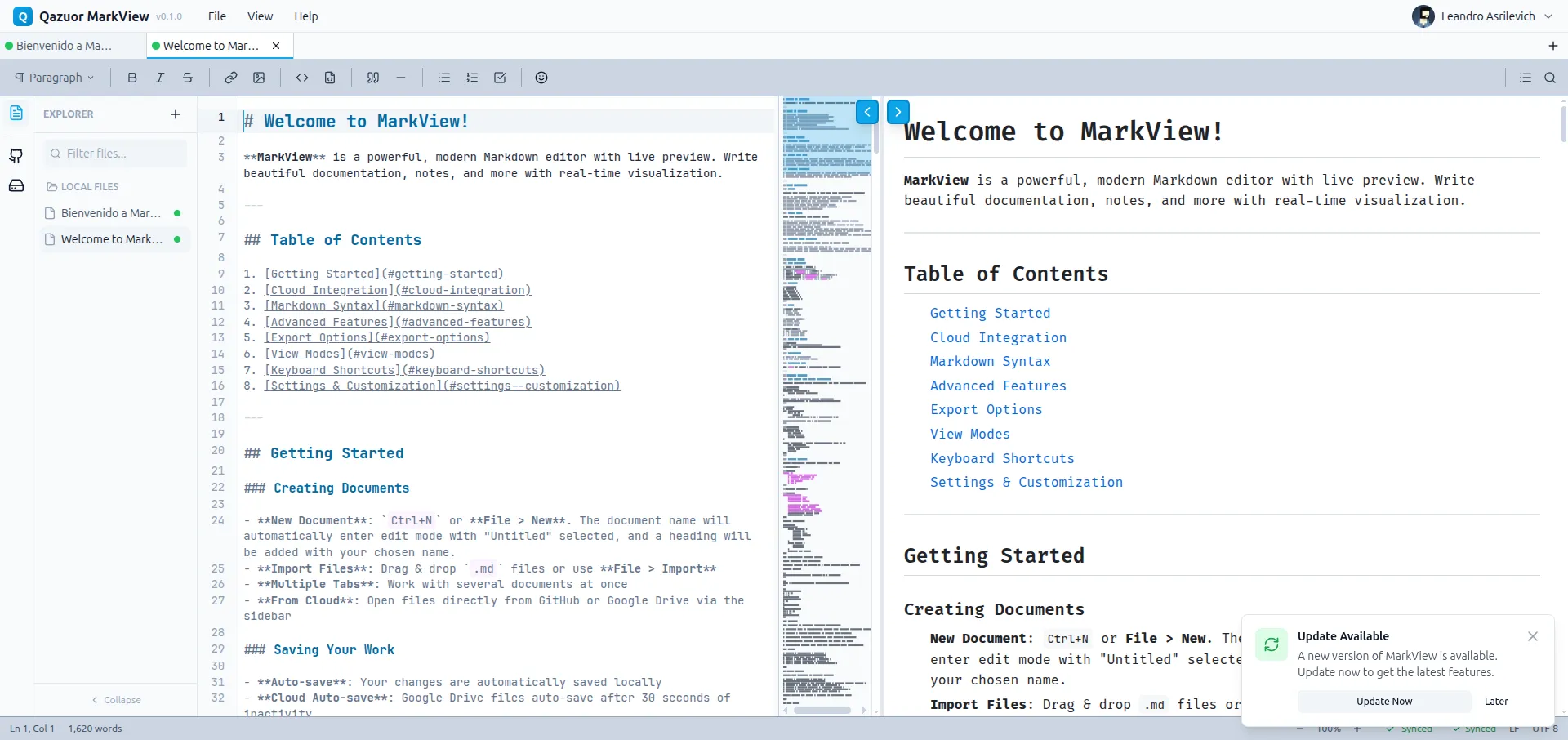
After spending time with various alternatives and none fully convincing me, I decided to build my own. That’s how MarkView was born: a modern markdown editor, with real-time preview, GitHub and Google Drive synchronization, and offline support as a PWA.
The problem I wanted to solve
My markdown workflow includes:
- Project documentation that lives in GitHub repos
- Technical notes that I want to access from any device
- Post drafts that I eventually publish on my blog
- README and changelogs that I edit frequently
I tried the GitHub web editor for GitHub docs (I don’t like it). For notes I tried Notion (didn’t convince me either). For posts I used local VS Code (no auto sync, only on my PC, etc).
I wanted a single tool that:
- Works in the browser, no installation required
- Has a powerful editor with keyboard shortcuts
- Shows real-time preview
- Syncs directly with GitHub and Google Drive
- Works offline when I don’t have a connection
The architectural decisions
Why CodeMirror 6
The editor is the main part of the application. I evaluated three options:
| Option | Pros | Cons |
|---|---|---|
| Monaco (VS Code) | Feature-complete, familiar | 2MB+ bundle, overkill for markdown |
| ProseMirror | Excellent for rich text | WYSIWYG, I don’t want to hide the syntax |
| CodeMirror 6 | Modular, lightweight, extensible | Learning curve |
I chose CodeMirror 6 for three reasons:
- Modularity — I only import the extensions I need
- Performance — Native virtual scrolling for long documents
- Extensibility — I can create custom extensions without touching the core
CodeMirror 6’s architecture is different from the previous version. Everything
is immutable and functional. It was confusing at first, but once I understood
the State → Transaction → New State model, the code became very predictable.
// Example of custom extension to insert frontmatterconst insertFrontmatter = StateCommand({ run(view) { const frontmatter = '---\ntitle: \ndate: \n---\n\n'; view.dispatch({ changes: { from: 0, insert: frontmatter }, selection: { anchor: 10 }, // Position cursor at title }); return true; },});Why Zustand and not Redux or Context
State management was another important decision. MarkView has multiple state domains:
- Documents — Content, metadata, version history
- UI — Open modals, active panel, sidebar collapsed
- Settings — Theme, font size, auto-save interval
- GitHub — Repos, branches, remote files
- Google Drive — Folders, files, sync state
- Sync — Operation queue, connection state
With Redux, this would be 6 slices with a lot of boilerplate. With Context, it would be 6 nested providers with unnecessary re-renders.
Zustand allows me to have 6 independent stores that subscribe granularly:
export const useDocumentStore = create<DocumentState>((set, get) => ({ documents: [], activeDocumentId: null,
setContent: (id, content) => { set((state) => ({ documents: state.documents.map((doc) => doc.id === id ? { ...doc, content, modified: true } : doc ), })); // Trigger auto-save get().scheduleAutoSave(id); },}));
// In a component, I only subscribe to what I needconst content = useDocumentStore( (state) => state.documents.find((d) => d.id === activeId)?.content);This avoids unnecessary re-renders. If I change a document’s content, only the components using that specific content re-render.
Why Hono for the backend
The backend is minimal: it handles OAuth, proxies requests to GitHub/Google APIs, and stores user preferences.
I chose Hono over Express or Fastify because:
- Ultra lightweight — ~14KB vs ~200KB of Express
- Edge-ready — Works on Vercel Edge, Cloudflare Workers, Deno
- Type-safe — Native integration with Zod for validation
- Excellent DX — Similar to Express but more modern
const github = new Hono() .use('/*', authMiddleware) .get('/repos', async (c) => { const user = c.get('user'); const repos = await octokit.repos.listForAuthenticatedUser(); return c.json(repos.data); }) .post( '/files/:owner/:repo/*', zValidator('json', saveFileSchema), async (c) => { const { content, message } = c.req.valid('json'); const path = c.req.param('*'); // ... save to GitHub } );Real problems and how I solved them
Scroll sync between editor and preview
The problem: I wanted scrolling the editor to move the preview to the corresponding section (and vice versa). But markdown doesn’t have a 1:1 relationship with the rendered HTML.
A heading ## Title takes up one line in markdown but can be an <h2> with
variable padding and margin in the preview. A 10-item list in markdown is 10
lines, but in HTML they’re <li> elements with different heights depending on
the content.
The solution: I created a rehype plugin that annotates each HTML element with its source line:
function rehypeLineNumbers() { return (tree: Root) => { visit(tree, 'element', (node) => { if (node.position?.start?.line) { node.properties = { ...node.properties, 'data-source-line': node.position.start.line, }; } }); };}With this, each preview element has a data-source-line attribute. When I
scroll the editor, I find the preview element closest to the visible line and
scroll it into the viewport.
const syncPreviewToEditor = useCallback((editorLine: number) => { const elements = previewRef.current?.querySelectorAll('[data-source-line]'); let closest = null; let minDistance = Infinity;
elements?.forEach((el) => { const sourceLine = parseInt(el.getAttribute('data-source-line') || '0'); const distance = Math.abs(sourceLine - editorLine); if (distance < minDistance) { minDistance = distance; closest = el; } });
closest?.scrollIntoView({ behavior: 'smooth', block: 'center' });}, []);Editing conflicts with cloud services
The problem: The user can edit a document locally while someone (or themselves from another device) modifies it on GitHub or Google Drive. Without conflict handling, whoever saves last wins and changes are lost.
The solution: I implemented a conflict detection system based on ETags and timestamps:
- When opening a file, I save its
etagormodifiedTime - Before saving, I check if it changed on the server
- If it changed, I show a resolution modal with three options:
- Use local version — Overwrite the server
- Use remote version — Discard local changes
- Manual merge — Show diff and let the user decide
async function checkForConflicts(doc: Document): Promise<ConflictResult> { if (doc.source === 'github') { const remote = await fetchGitHubFile(doc.path); if (remote.sha !== doc.remoteSha) { return { hasConflict: true, localContent: doc.content, remoteContent: remote.content, localTimestamp: doc.lastModified, remoteTimestamp: remote.committedAt, }; } } return { hasConflict: false };}The conflict modal uses a side-by-side diff viewer that highlights differences. It was more work than I expected, but it prevents data loss.
Preview performance with Mermaid and KaTeX
The problem: The preview updates on every keystroke (debounced to 300ms). But if the document has Mermaid diagrams or KaTeX equations, each update was slow because it re-rendered everything.
Mermaid especially is heavy. A medium-sized flowchart takes ~100ms to render. With 5 diagrams in a document, the preview lags noticeably.
The solution: Cache of rendered blocks with selective invalidation:
const blockCache = new Map<string, { hash: string; html: string }>();
function getCachedBlock( type: 'mermaid' | 'katex', content: string): string | null { const hash = hashContent(content); const key = `${type}:${hash}`;
if (blockCache.has(key)) { return blockCache.get(key)!.html; } return null;}
function cacheBlock(type: string, content: string, html: string): void { const hash = hashContent(content); const key = `${type}:${hash}`; blockCache.set(key, { hash, html });}Now, when the user edits normal text, Mermaid diagrams use the cached version. They only re-render when the specific block content changes.
Version history per document
The problem: I wanted a version history like “undo on steroids”, where you can see previous versions of a document and diff between them. But each tab has its own independent history.
The solution: Each document has its array of versions with timestamps and content. The challenge was storage, since localStorage has a ~5MB limit.
I implemented:
- Version limit — Maximum 50 versions per document
- Delta compression — I only save the diff, not the full content
- Automatic pruning — Old versions are deleted when the limit is exceeded
// stores/documentStore.ts - versioning logicaddVersion: (docId, content) => { const doc = get().documents.find((d) => d.id === docId); if (!doc) return;
const previousContent = doc.versions[doc.versions.length - 1]?.content || ''; const delta = createDelta(previousContent, content);
const newVersion: Version = { id: generateId(), timestamp: Date.now(), delta, contentHash: hashContent(content), };
const versions = [...doc.versions, newVersion].slice(-50); // Keep last 50
set((state) => ({ documents: state.documents.map((d) => d.id === docId ? { ...d, versions } : d ), }));};The diff viewer uses a line-by-line diff algorithm with change highlighting. It’s not as sophisticated as git diff, but it works well for markdown documents.
The preview theme system
I added themes so the preview looks like:
- GitHub Light/Dark
- GitLab
- Notion
- Obsidian
- Stack Overflow
- Dev.to
Each theme is a CSS file that tries to replicate the styles of each platform. They’re not exact copies (that would be complex and fragile), but they capture the visual essence.
.preview-theme-github-dark { --preview-bg: #0d1117; --preview-text: #c9d1d9; --preview-heading: #c9d1d9; --preview-link: #58a6ff; --preview-code-bg: #161b22; --preview-blockquote-border: #3b434b; /* ... more variables */}
.preview-theme-github-dark h1 { padding-bottom: 0.3em; border-bottom: 1px solid var(--preview-blockquote-border);}
.preview-theme-github-dark code { background: var(--preview-code-bg); padding: 0.2em 0.4em; border-radius: 6px; font-size: 85%;}The user can change the preview theme independently of the app theme. It’s useful to see how a README will look before pushing it.
PWA and offline support
MarkView works completely offline.
Service Worker strategy
I use Workbox with a mixed strategy:
- App shell — Cache-first with background update
- Static assets — Cache-first, versioned by hash
- API calls — Network-first with cache fallback
// sw.ts (simplified)registerRoute( ({ request }) => request.destination === 'document', new NetworkFirst({ cacheName: 'pages', networkTimeoutSeconds: 3, }));
registerRoute( ({ request }) => request.destination === 'script' || request.destination === 'style', new CacheFirst({ cacheName: 'assets', plugins: [new ExpirationPlugin({ maxAgeSeconds: 30 * 24 * 60 * 60 })], }));Deferred sync
When the user is offline, cloud save operations are queued:
const syncQueue: SyncOperation[] = [];
function queueOperation(op: SyncOperation) { syncQueue.push(op); persistQueue(); // Save to IndexedDB}
// When connection returnswindow.addEventListener('online', () => { processQueue();});
async function processQueue() { while (syncQueue.length > 0) { const op = syncQueue[0]; try { await executeOperation(op); syncQueue.shift(); persistQueue(); } catch (error) { // Retry later or show error to user break; } }}Onboarding and UX
Even though I made it thinking about my own personal use, the idea was to offer it to the community, and in that case an editor with several features needs to guide the user. So I implemented:
Interactive tour
On first use, a tour guides through the main features:
- The editor and its shortcuts
- The preview panel
- The file explorer
- Cloud integration
- Export options
Each step highlights the relevant element and waits for interaction before continuing.
Contextual hints
Small tooltips that appear when the user does something for the first time:
- “Tip: Use Ctrl+B for bold”
- “Tip: You can drag .md files here”
- “Tip: Right-click for more options”
Hints are marked as seen and don’t appear again.
Lessons learned
What worked well
-
CodeMirror 6 — Worth the learning curve. Performance and extensibility are excellent.
-
Zustand with separate stores — Keeps code organized and avoids unnecessary re-renders.
-
PWA from day one — Adding it later would have been much more work.
-
Aggressive preview caching — The performance difference is noticeable.
What I’d do differently
-
Use IndexedDB from the start — localStorage has size limitations that forced me to compress history.
-
Earlier E2E tests — Unit tests don’t capture integration bugs. Playwright should have come in earlier.
Closing
MarkView started as “I want a better editor” and ended up being a 3, almost 4 week project with many lines of code. Is it perfect? No. Does it solve my original problem? Absolutely.
I use it every day for documentation, notes, and drafts. Syncing with GitHub saves me from jumping between tools. Offline support lets me write anywhere.
If you have a similar workflow or just want a modern markdown editor that works in the browser, try it. It’s open source and free.
The best tools are the ones you build for yourself, because you understand exactly what problem they solve.
References
- MarkView on GitHub — Source code
- MarkView Demo — Try it online
- MarkView - Project Page — More details
- CodeMirror 6 — Editor documentation
- Unified/Remark — Markdown pipeline